
Maximizing HDD Jobsite Efficiency: Why the Right Transmitter and Equipment Compatibility Matter
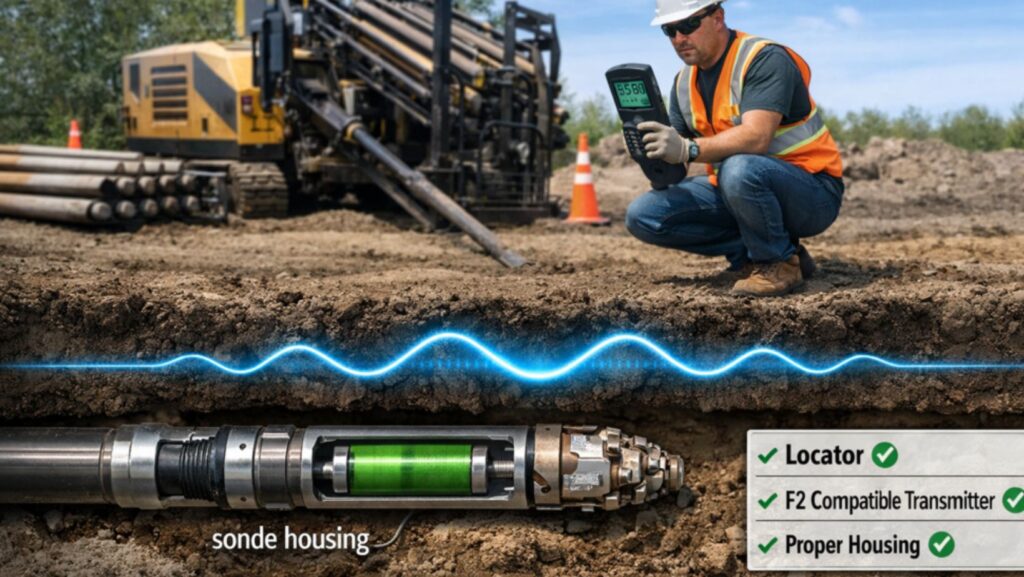
Few things frustrate a horizontal directional drilling (HDD) crew more than having to pause a bore because the locator signal suddenly goes haywire. The drill rig might be in perfect shape, the drilling fluid is flowing, and the crew is highly experienced—yet the moment the signal gets jumpy, everything stops.
Depth readings start to look suspicious, the drill head’s pitch no longer seems to match up with the rods, and before long the crew is second-guessing the guidance equipment instead of making progress. This common scenario underscores a simple truth: the difference between a smooth day and a stressful one often isn’t a brand-new rig, it’s a guidance system that stays consistent, simple, and predictable.
And at the heart of that guidance system is the humble HDD transmitter (or sonde) working in tandem with the locator.
In this article, we’ll explore how choosing the right transmitter and ensuring equipment compatibility can significantly boost jobsite efficiency. From reducing downtime to preventing costly mistakes, a focus on compatibility and proper transmitter selection can keep your projects on track and productive.
The Hidden Costs of Incompatible Equipment
Equipment compatibility in HDD is not just a technical concern—it directly impacts productivity and costs on the job. Many HDD issues actually start before the crew even begins drilling.
Imagine one rig grabs an older locator and another grabs a borrowed transmitter from a different system; nobody is quite sure if this combo will work well together. The bore begins, and when the signal inevitably fails or behaves erratically, everyone just blames “interference”.
In reality, the root cause is often a mismatched setup. Using a locator and transmitter that aren’t meant to pair can lead to unreliable readings or loss of signal at critical moments.
The downtime caused by such mismatches can be significant. Every time crews have to stop and troubleshoot a weak or erratic signal, you’re burning valuable hours. Worse yet, poor readings can lead to drilling mistakes. Interference or incompatibility can produce inaccurate bore path data, and if a mistake is made it could cause thousands of dollars in damage – for example, striking an existing utility line due to incorrect depth info.
In short, running an HDD job with incompatible or “make-do” equipment isn’t saving money at all; it’s risking far more in delays and potential accidents.
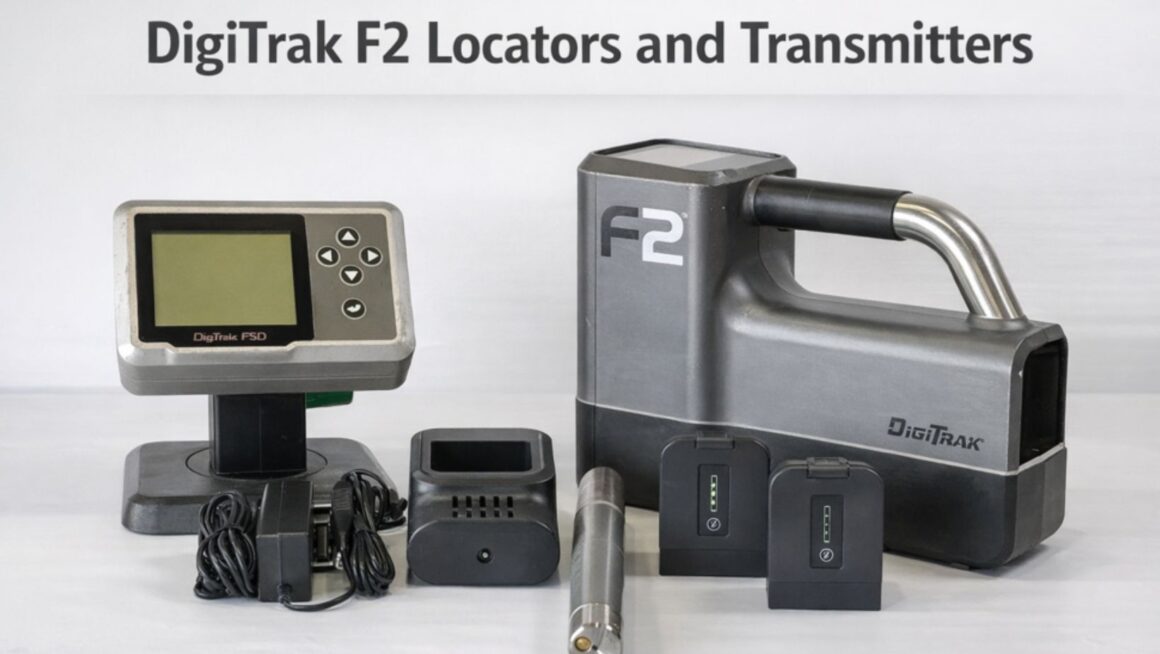
On the flip side, ensuring your gear is properly matched and communicates seamlessly can minimize downtime and keep the project moving. Stable, predictable locator readings mean the crew can drill with confidence rather than repeatedly stopping to double-check measurements. Professionals in the industry often note that typical utility installation jobs don’t require the fanciest new tools – they require a clean signal, predictable readings, and minimal downtime. All of that hinges on having the transmitter, housing, and receiver working in sync as an integrated system.
Transmitters: The Small Device with a Big Impact
It’s easy to underestimate how much the tiny transmitter in the drill head can influence the entire operation. After all, the transmitter (also called a beacon or sonde) is out of sight underground, and as long as the locator above is picking up something, many crews assume all is well. But even the best locator is useless if the transmitter is weak, damaged, or not suited to that locator. Conversely, a healthy, well-matched transmitter can make a mid-range locator feel rock-solid in performance. In other words, a top-of-the-line receiver won’t save you if your transmitter isn’t up to par or isn’t the right type for the job.
Choosing “the right transmitter” means looking at a few key factors:
- Compatibility with your locator: Manufacturers design transmitters and receivers to work as a system. Always use a transmitter that is specified for your locator’s model or frequency range. For instance, if your fleet primarily runs DigiTrak F2 locators, it’s crucial to equip them with an F2 compatible transmitter designed for that system (along with the proper sonde housing) so everything works seamlessly together. Using a transmitter not intended for your locator can result in weak signals or data that doesn’t make sense to the readout.
- Range and power needs: Consider the typical depth and distance of your bores. If most of your projects are short utility runs, a standard transmitter will suffice. But if you occasionally take on deeper or high-interference bores (near lots of underground metal or power lines), you may need a higher-powered transmitter or one with advanced frequency options. Some modern transmitters (for example, DCI’s Falcon series) offer hundreds of frequencies or ultra-low frequency modes to sidestep interference. The goal is to have a transmitter that can maintain a strong signal in your working conditions, so you’re not losing track of the drill head.
- Signal frequency and interference resistance: Jobsite environments are getting more crowded with signals – from rebar in concrete to electrical lines – all of which can interfere. Interference leads to poor readings or an inaccurate plotted path, raising the risk of costly errors. The right transmitter will operate on frequencies that avoid common interference ranges, or use spread-spectrum technology to find a clear channel. In practice, this means fewer instances of the locator “jumping” or giving ghost readings when you’re near obstacles.
- Durability and battery life: HDD transmitters deal with immense pressure, vibration, and heat inside the drill head. A quality transmitter should be rugged enough to handle these conditions for extended periods. Long battery life (or rechargeable options) also contributes to efficiency – you don’t want to pull back just to swap batteries because the transmitter died mid-bore. Many crews keep extra battery packs or choose transmitters with multi-power modes that extend operating time for longer drills.
In short, the transmitter might be small, but it has an outsized impact on whether your daily drilling runs are productive or problematic. Investing in the right unit for your locator and typical job conditions pays off quickly by preventing headaches.
Ensuring Equipment Compatibility and Best Practices
Achieving optimal performance is not just about buying the right model of transmitter – it’s about how you implement and maintain that equipment on the job. Industry veterans recommend the following best practices to keep your HDD operations efficient and trouble-free:
- Standardize Your Setup: Wherever possible, use the same locator-transmitter pairs across your fleet for routine jobs. When each crew leaves the yard with a consistent, known configuration, performance becomes predictable and training new crew members is easier. For example, you might decide that all your service crews will run DigiTrak F2 locators with one or two specific transmitter models that you’ve tested and trust. This way, you’re not mixing and matching gear and hoping it plays nice – you know it does.
- Match the Housing and Transmitter: Use sonde housings that are designed for your transmitter’s dimensions and frequency. A housing that properly fits your transmitter will protect it from drilling stress while allowing the signal to transmit effectively. If the transmitter is crammed into an ill-fitting housing or one made of the wrong material, you could unintentionally weaken the signal or cause the transmitter to overheat. Ensure the housing’s material and wall thickness won’t excessively block the signal (for instance, many operators prefer aluminum or composite housings because they strike a good balance between protection and signal transparency). Incompatible housings or missing shock-absorbers can also lead to inconsistent readings if the transmitter vibrates or moves around, so always pair the correct housing with your transmitter model.
- Carry a Tested Spare: No matter how high-quality your primary transmitter is, it’s smart to have a backup on hand – an identical, tested spare unit ready to go. If your main transmitter fails or starts giving erratic data mid-job, swapping in a spare can save the day and prevent an extended shutdown. The spare should be the same model and frequency so that it’s truly interchangeable with the primary. Make it a habit to test spare transmitters regularly (perhaps during routine maintenance or at the start of a project) so you know they’re functional when needed.
- Label and Track Your Transmitters: In a busy operation, transmitters might rotate between crews and rigs. Tag each transmitter clearly (e.g. with an ID number or “Crew A Primary,” “Crew A Backup”) and keep a simple log of which one is used on which job. This practice helps with troubleshooting later – if one transmitter consistently shows weak range, you’ll identify it from the logs and can send it for repair or retirement. It also prevents confusion if multiple transmitters are charging at the shop; crews will take the correct unit assigned to them, rather than accidentally grabbing the wrong frequency sonde.
- Perform Site Calibration: Each new jobsite presents unique conditions – different soil composition, moisture, ambient electrical noise, etc. Before drilling, always calibrate the transmitter and locator at the jobsite to tune them for those specific conditions. Skipping this step can lead to depth errors or lost signals if the equipment isn’t adjusted to the local environment. A quick calibration ensures the locator knows exactly how to interpret the transmitter’s signal in that soil (improving depth accuracy) and verifies that everything is working correctly before you commit to a bore path. This extra step can prevent frustrating surprises like finding out halfway through a bore that your depth readings are off because the system wasn’t calibrated for the dense clay you’re drilling in.
- Routine Maintenance and Checks: Treat your guidance gear with the same care as your drilling rig. Simple habits can add years to the life of your locator and transmitter. For instance, store the locator in a padded case, and bench-test your locator-transmitter combo before leaving the yard each day. If the signal looks weak in the test or any reading seems off, it’s far better to discover that in the yard than underground in the middle of a job. Keeping battery contacts clean, updating firmware (if applicable), and inspecting the transmitter’s casing for damage are all small tasks that pay dividends in reliability.
By following these practices, you create a more controlled and predictable operating environment. Crews know exactly what equipment they’re dealing with, management knows that downtime risks are minimized, and clients get their installations completed on schedule.
Conclusion: Efficiency Begins with the Right Choices
In the horizontal drilling business, success often comes down to managing the details. The transmitter might not be as big-ticket an item as the drilling rig or as visible as the drill head, but it is arguably the linchpin of your locating system’s performance. Investing the time and resources to choose a transmitter that’s compatible with your locator and suited to your typical jobs, and then using it within a well-matched system, will return that investment many times over in jobsite efficiency.
Think of it this way: when your locator and transmitter are in harmony, the crew can focus on steering the bore and maintaining production, rather than fighting the equipment. Jobs finish faster, with fewer interruptions for signal issues and less “mystery troubleshooting” when something doesn’t read right. In an industry where time is money and mistakes are costly, those are huge advantages.
Whether you’re a contractor running a single HDD rig or managing a whole fleet, the principle is the same – choosing the right transmitter and ensuring equipment compatibility is key to drilling more and worrying less. By standardizing your gear, keeping it in peak condition, and heeding the guidance of experienced pros, you’ll be well on your way to smoother, more efficient HDD projects every time.
Sources:
- Parker, Steven. Why DigiTrak F2 Is Still the Best Everyday HDD Locator. World Business Outlook, Dec. 15, 2025.
- Parker, Steven. The Importance of Calibrating the Transmitter with HDD Locator at Every Job Site. PilotTrack HDD, Apr. 4, 2025.
- How to Find Quality HDD Transmitters for Construction. e-Architect, Apr. 26, 2025.
- Parker, Steven. How Sonde Housing Design Impacts HDD Transmitter Signal Performance. PilotTrack HDD, Apr. 2, 2025.
Transmitters – DigiTrak Falcon F2 Series. Digital Control Inc. (product specifications)
About The Author

 12 Home Staging Furniture Companies to Consider
  Add The Perfect Bathroom Fast With HomeDirect: A Practical 2026 Rapid-Install Guide
  Metacore And The Mystery Of Everywear, Finnish Roots, And RapidHomeDirect — What You Need To Know In 2026